

Digital Go Bag: The Truly Exhaustive Checklist for Disasters, Fires, and Insurance Claims
A truly exhaustive digital go bag checklist to prepare for major weather events or house fires—organize insurance proof, valuables documentation, a home inventory, and recovery paperwork to speed insurance claims.
A major weather event, evacuation, or house fire can destroy not only your belongings, but the documentation you need to prove ownership and value. This digital go bag checklist is built to help you recover faster: identify yourself, access money, replace essentials, and file insurance claims with fewer delays.
If you only do one thing today, create a “core” disaster document hub and add your insurance + ID + a home inventory walkthrough. Use this as your central resource: domidocs.com/weather.
What Is a Digital Go Bag?
A digital go bag is a secure, portable set of copies of your most important documents—stored so you can access them even if you can’t return home. Preparedness guidance commonly recommends keeping copies of critical records and being able to access them quickly. (ready.gov)
Smoke, water, and evacuation don’t care where your file cabinet is. A digital go bag gives you access from a hotel, shelter, or relative’s house—when you’re trying to prove loss, identity, and coverage.
If you want a “grab-and-go” paper companion too, see: Your Essential Home Document Evacuation Kit for Disasters.
Why Insurance Claims Get Stuck
Claims slow down when you can’t quickly prove (1) who you are, (2) what coverage you had, (3) what you owned, and (4) what it’s worth. Maintaining an up-to-date inventory helps prove what you owned and can speed claim processing. (ready.gov)
Helpful DomiDocs guides: How to Create a Digital Home Inventory (and Why You Need One) and How To File An Insurance Claim.
Set Up Your Digital Go Bag (So It Works Under Stress)
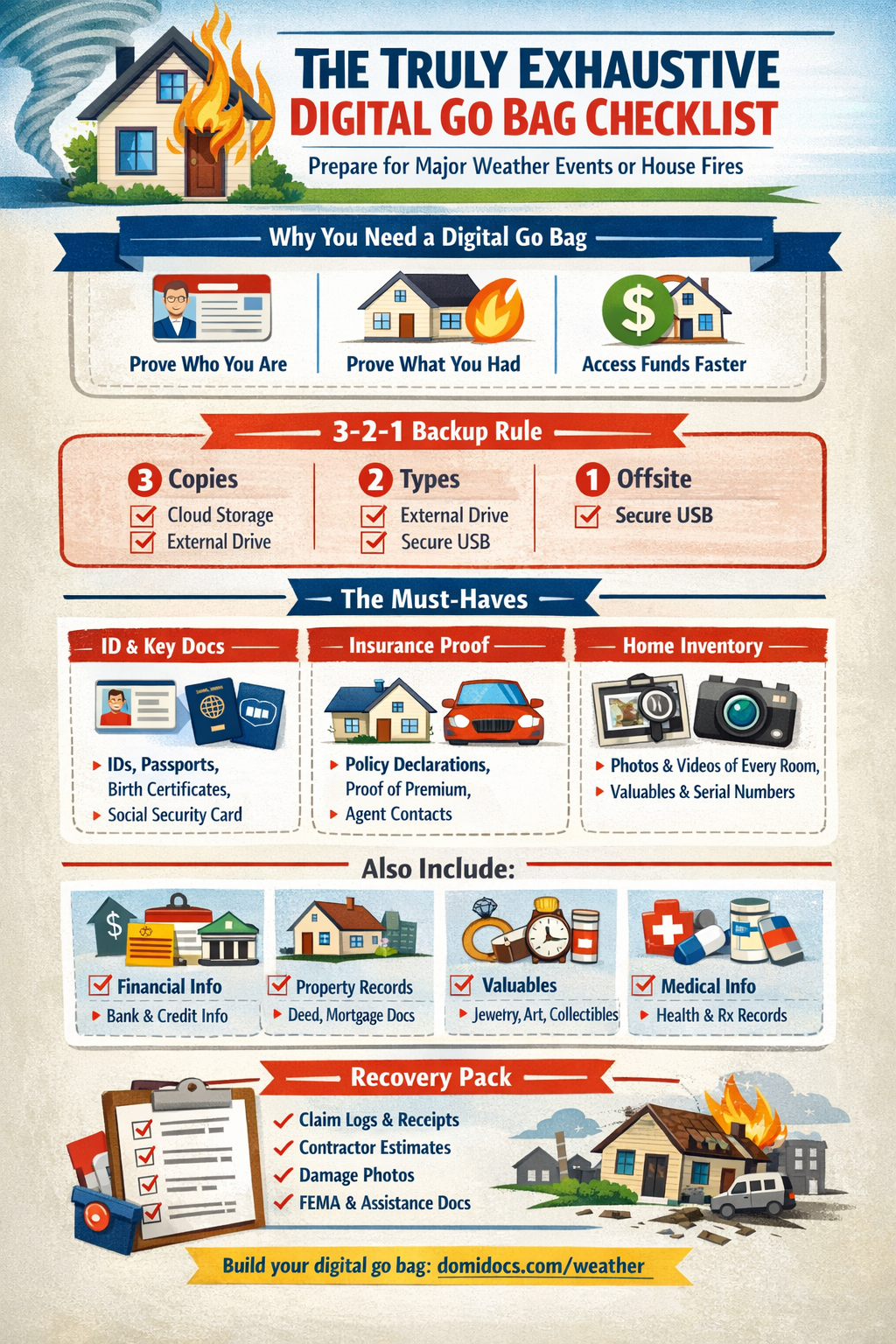
3 Copies, 2 Types, 1 Offsite
- Primary: secure cloud or dedicated platform
- Backup: encrypted external drive or second cloud
- Offline: password-protected USB/drive (optional)
Standard Naming
Use: Category_Subject_Date (e.g., Insurance_HomeDecPage_2026-01-15.pdf)
Emergency Access Plan
- Share access with a trusted spouse/partner/executor
- Store a printed emergency contact sheet offline
- Keep insurer + lender + agent numbers available offline
For a guided approach built around weather events and documentation, use Documenting for Disaster® by DomiDocs®.
The Truly Exhaustive Digital Go Bag Checklist
(Must-Have) = do these first if you’re short on time.
A narrated home walkthrough + high-value item photos + your insurance declarations pages. That combo often prevents “prove it” delays. (ready.gov)
A) Identity & Household Verification
- (Must-Have) Driver’s licenses / state IDs (front + back)
- (Must-Have) Passports
- (Must-Have) Birth certificates
- (Must-Have) Social Security cards (or secure reference info)
- Marriage certificate / divorce decree
- Immigration / naturalization records (if applicable)
- Recent family photos (helpful for reunification/verification)
B) Insurance Proof Pack (What to Save So You Can Prove Coverage)
Don’t store only “policy numbers.” Store proof you had coverage, what it covered, and what you paid—so you can answer questions fast.
- (Must-Have) Declarations pages for all policies (home/renters, auto, flood, umbrella)
- (Must-Have) Full policy PDF/booklet if available (or key endorsement pages)
- (Must-Have) Proof of premium paid (recent invoice, bank/credit statement showing payment)
- (Must-Have) Claim phone numbers + online claim links + agent/broker contact
- (Must-Have) Deductibles summary (hurricane/wind/hail/flood/standard)
- Endorsements that change coverage (e.g., roof, sewer backup, special limits, replacement cost)
- Photos/screenshots of limits for dwelling, other structures, personal property, ALE/Loss of Use
- Prior claims history documentation (if any)
- Mortgagee/loss payee clause details (especially if you have a mortgage)
- Flood insurance documents (if applicable) and elevation certificate (if you have one)
- Temporary relocation / hotel guidance (ALE) and any pre-approvals you’ve received
How To File An Insurance Claim and Disaster Recovery With Insurance.
C) Home & Property Ownership Records
- (Must-Have) Deed / title / closing documents
- (Must-Have) Mortgage statement + lender contact
- Home appraisal(s)
- Property tax records
- Survey / plat map
- HOA documents + contacts (if applicable)
- Permits, inspection reports, contractor invoices (roof, HVAC, remodels)
- Mitigation proof: hurricane shutters, impact windows, roof upgrades, wildfire hardening
- Warranty documents (roof, appliances, HVAC, solar, generator)
- Utility account numbers + provider contacts
D) Valuables / Art / Jewelry / Collectibles Proof Pack
High-value items are where people lose the most money—because they don’t have proof of ownership, value, or condition. Build a “high-value vault” section in your digital go bag.
- (Must-Have) Photos of each item from multiple angles (include close-ups of maker marks/signatures)
- (Must-Have) Video of each item + any identifying features
- (Must-Have) Appraisals and valuation documents (PDFs)
- (Must-Have) Receipts, invoices, bills of sale, auction confirmations
- (Must-Have) Provenance / authenticity docs (certificates, gallery letters, grading reports)
- Serial numbers (watches, cameras, instruments, electronics)
- Photos of the item in your home (helps show ownership/possession)
- Storage/installation proof (safe deposit box info, mounting/installation invoices)
- Scheduled personal property rider pages (if insured separately)
Put a small card in the frame with today’s date and the room name (“Primary Bedroom Closet”). It helps establish timeline + location when you’re reconstructing a claim.
E) Home Inventory (Claim-Saving Section)
- (Must-Have) Whole-home narrated walkthrough video (slow, open closets/drawers)
- (Must-Have) Room-by-room photo set (wide shots + details)
- (Must-Have) Serial numbers/model numbers for appliances/electronics (photo the labels)
- (Must-Have) Receipts or proof of purchase where possible
- (Must-Have) “Before” exterior photos (roof, siding, windows, fence, sheds, landscaping)
- Inventory spreadsheet or app export (include purchase date + price + replacement estimate)
- Renovation documentation (materials, dates, invoices, contractor contacts)
Ready.gov notes an inventory can speed claims. (ready.gov) The NAIC also offers a home inventory resource and app. (content.naic.org) DomiDocs inventory guidance: Create a Digital Home Inventory.
F) Financial & Access-to-Money
- (Must-Have) Bank account info + customer support numbers
- (Must-Have) Credit card info + issuer support numbers
- (Must-Have) Recent statements (bank, mortgage, credit)
- (Must-Have) Auto loan/lease docs
- Retirement/investment summaries
- List of monthly bills + due dates + autopay details
- Proof of income (pay stubs, benefits letters)
- Emergency cash plan notes (where/how you access funds)
G) Medical
- (Must-Have) Health insurance cards
- (Must-Have) Prescription list (name, dose, pharmacy, prescriber)
- Vaccination records
- Allergies and major conditions (one-page summary)
- Durable medical equipment documentation
H) Vehicles
- (Must-Have) Auto insurance declarations page
- Registrations
- Titles (if owned)
- Photos of VIN + odometer
- Maintenance records
I) Work, School, and Dependent Care
- Employment verification / pay stubs
- School enrollment records
- Daycare/senior care contacts
- Special needs care plans
J) Pets
- (Must-Have) Vaccination records + microchip number
- Vet contact info
- Pet photos (for identification)
- Proof of ownership (adoption papers, receipts)
K) Digital Life & Account Recovery (Often Forgotten, Extremely Useful)
- (Must-Have) Password manager emergency access instructions
- (Must-Have) 2FA backup codes (stored securely) or recovery methods
- (Must-Have) Primary email access recovery steps
- Phone carrier account info (SIM replacement can be a bottleneck)
- Device inventory (phone/laptop/tablet) + serial numbers + proof of purchase
- Photos of your router/modem labels and ISP account number (optional but helpful)
L) The “After the Event” Recovery Pack (This Is What Gets You Back on Your Feet)
- (Must-Have) Loss log template (date/time, who you spoke with, what was said)
- (Must-Have) Receipts folder template (hotel, meals, fuel, supplies, temporary repairs)
- (Must-Have) Copies of communications with insurer/adjuster
- (Must-Have) Contractor estimates + invoices + license/insurance proof
- (Must-Have) Photos of all damage immediately after the event (wide + close-up)
- Temporary housing lease / rental agreements (if displaced)
- FEMA / local assistance documents (if applicable)
- Debris removal receipts
- Permits needed for rebuilding (varies by area)
Documentation still matters for aid and recovery planning. See: Disaster Recovery Without Insurance.
Weather Events vs. House Fires: What Changes?
For major weather (hurricanes, floods, wildfires)
- Add: evacuation plan, fuel plan, generator docs, mitigation receipts
- Add: pre-storm exterior “baseline” photos (roof, windows, fences, trees)
- Add: flood-specific docs if relevant (policy + elevation certificate)
More preparedness guides: Hurricane Preparedness, Flood Preparedness, Wildfire Preparedness.
For house fires
- Prioritize: identity + insurance proof + inventory + temporary housing paperwork
- Keep: a printed escape plan + meeting place plan (practice it)
NFPA recommends creating and practicing a home fire escape plan. (nfpa.org)
Smoke damage can affect everything—even “intact” items. Your inventory photos/videos help establish pre-loss condition and presence in the home.
How Often Should You Update Your Digital Go Bag?
- Quarterly: insurance dec pages, contacts, major purchases
- Annually: redo your home walkthrough video + exterior baseline
- After life changes: move, remodel, new vehicle, new policy, new dependents
See: How Often Should You Update Your Home Inventory for Insurance?
Quick Start: Build a “Good Enough” Digital Go Bag in 30 Minutes
- Photograph IDs + insurance declarations pages + mortgage statement + vehicle registration
- Record a narrated 5–10 minute home walkthrough video
- Photograph your top 15 high-value items (art/jewelry/electronics) + serial numbers
- Upload to secure storage and share emergency access with one trusted person
- Bookmark your disaster documentation hub: domidocs.com/weather
Start here and build your digital go bag around it: domidocs.com/weather.
Helpful External Resources
- Ready.gov / FEMA: Safeguard Critical Documents and Valuables (PDF) (ready.gov)
- Ready.gov: Document and Insure Your Property (PDF) (ready.gov)
- NAIC: Home Inventory (and the NAIC Home Inventory App) (content.naic.org)
- American Red Cross: Emergency Kit Checklist (PDF) (redcross.org)
- IRS Publication 547: Casualties, Disasters, and Thefts (irs.gov)
FAQ
What should I prioritize if I only have one hour?
Focus on IDs + insurance declarations pages + proof of premium paid + a home walkthrough video + photos of your top high-value items. That combination is directly aligned with proving ownership and speeding claims. (ready.gov)
Do I really need photos of valuables like art or jewelry?
Yes. High-value items are commonly limited unless scheduled, and proof of ownership/value matters. Photos, appraisals, receipts, and rider pages are your best protection.
Should I keep paper copies too?
Many preparedness resources recommend keeping copies of important documents in a waterproof/portable container as well. (ready.gov)
Where should I store my digital go bag?
Use a secure cloud location with strong authentication plus a backup. The goal is access even if you can’t return home. For a disaster-focused structure, use Documenting for Disaster® by DomiDocs®.
A digital go bag isn’t just IDs and a policy number—it’s proof. Proof of coverage, proof of ownership, proof of value, and proof of expenses after the loss. Build yours around domidocs.com/weather so you’re not scrambling later.
Your Digital Go Bag (InfoGraphic)
Digital Go Bag Checklist
Use this interactive checklist to build your digital go bag. Check items off as you upload them.
Quick start
- Upload IDs and insurance declarations pages first.
- Record a narrated home walkthrough video.
- Photograph your top high value items and serial numbers.
Fastest claim booster
A narrated home walkthrough plus high value item photos plus your insurance declarations pages often prevents "prove it" delays.
The checklist
Progress is saved in your browser on this device.
Identity and household verification
Insurance proof pack
Home and property ownership records
Valuables proof pack
Pro tip for photos
Put a small card in the frame with today’s date and the room name. This helps establish timeline and location.